
Your plant’s data doesn’t need to be clean
Most AI tools assume your plant’s records are clean, current and consistent. No operating plant’s records are. Here is how Hazard Navigator works with them anyway.
The assumption that keeps most plants out
Ask an AI search assistant whether a hazard-analysis AI suits your chemical plant, and you will probably get the same caveat we did: “AI-driven hazard models require clean digital inputs.” Outdated P&IDs or patchy incident logs, it warns, mean false alarms or a long cleanup before you see any value.
For most AI tools, that caveat is fair. They are built and tested on tidy data, and they expect one current, consistent source of truth.
No operating plant has one. Process safety information builds up over decades of revalidations, contractors, software migrations and ownership changes. If clean data were truly a precondition, almost no facility would qualify, and the facilities that most need help would qualify least.
We built Hazard Navigator the other way around. It works from your documents as they are, and it treats the places where they disagree as findings to report, not as mess you must clean up before you start.
What plant records really look like
In the plants we have worked with, the records disagree with each other in small, ordinary ways. A few patterns come up again and again:
The same pump is P-101A in the HAZOP, P101A in the maintenance system, and “feed pump A” in the operating procedure.
The PHA for a second train was copied from the first, and some rows still carry the first train’s tag numbers.
An MOC changed a set point or a line, but the P&ID revision and the PHA scenario that depend on it were never updated.
Studies from different decades, facilitators and software use different risk matrices, sometimes more than one in the same file.
Drawings exist as PDFs, and spreadsheets change their column layout from one revision to the next.
None of this means a plant is badly run. It is what thirty years of careful, honest record-keeping looks like.
It is also where risk hides. A change that never reached the hazard study, or a safeguard credited in one study and missing from another, shows up as a disagreement between documents. Clean the data first, and you erase the very evidence that was worth finding.
We read what you already have
Hazard Navigator takes in the process safety information a plant already holds, in the form it already holds it. There is no preparation step, no restructuring and no re-keying into our template.
Prior hazard studies. HAZOP and LOPA worksheets from Excel files, PDF reports or PHA software exports, with the site’s own node and deviation conventions.
P&IDs. Equipment, lines and instruments, from CAD files, PDFs or scanned sheets.
MOC records. Each change, matched to the equipment and study rows it may affect, including changes recorded on scanned forms.
Incident records. Each event, linked to the equipment and scenarios it touches.
Asset registers. Your equipment list, as the reference every other document is checked against.
Safeguard registers. What each safeguard is credited for, and where.
Risk matrices. Each study’s own severity and likelihood scales and action thresholds.
Safety data sheets. The hazard properties of each material.
Files come in the formats you already use: Excel and CSV, Word, PowerPoint, PDFs (typed or scanned), CAD drawings (DWG and DXF), images of drawings, and XML exports from PHA software. Scanned pages are read with AI vision, so nobody has to retype them.
Three things hold for every source:
Each value keeps its address. Everything we extract links back to the passage it came from. For scans and drawings, that means the page and the spot on the page.
Each study keeps its own risk matrix. We read your matrix as written, rather than forcing every study onto one template.
Your systems stay untouched. We work from copies of your documents, read-only, with nothing written back.
How we do this is the product of a lot of work on real plant records, and we keep the details to ourselves. What matters to you is the result: a single, consistent model of your plant, built from the documents you have today.
When documents disagree, that is the finding
Hazard Navigator sorts disagreements between documents into two kinds. Some are just different names for the same thing, and it resolves them. The rest are real differences in the facts, and it reports them to you.
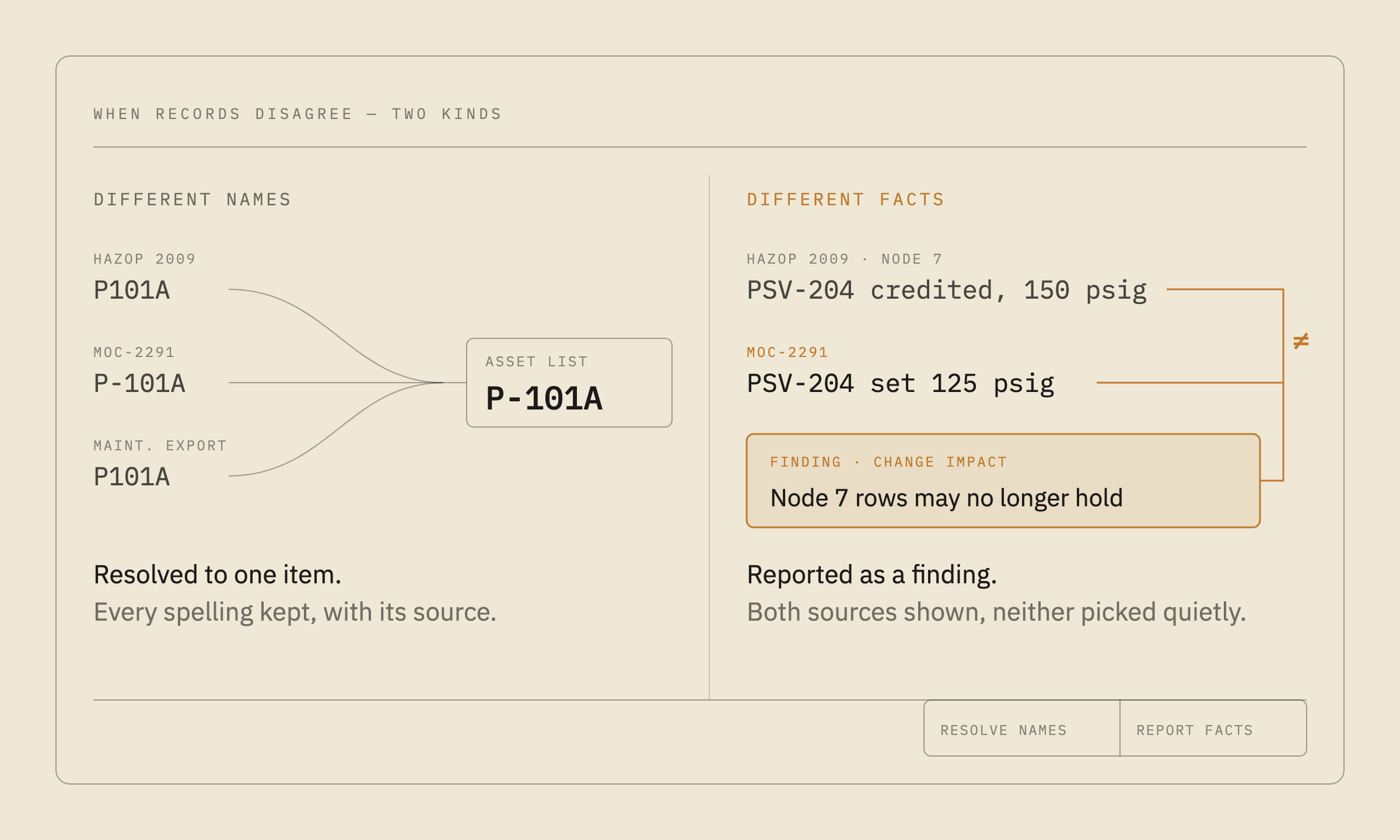
Different names for the same thing. P-101A in one document and P101A in another are matched to the same item on your asset list, and every name stays on record with its source. When a site’s tag convention is unclear, the tool proposes a reading and an engineer confirms it. When two records collide, they are held for review, not merged on a hunch.
Real differences in the facts. These become findings, ranked and ready to review:
Change impact. An MOC that adds, removes or weakens a safeguard, or changes equipment, materials or control logic, matched to the study rows it may invalidate.
Safeguard contradiction. A safeguard credited as an independent protection layer in some scenarios but not in others.
Uncredited instrument. An instrument on the P&ID that the hazard study never credits as a safeguard.
Unresolved risk. An incident on a piece of equipment that has no matching scenario in the hazard study.
Each finding opens to the source passages behind it. Where a call needs judgment, the review card sets out the question, the current assumption, the alternative and the evidence, so an engineer can settle it quickly.
This takes a great deal of comparing. On one representative facility, using real customer data, matching the hazard study against the incident history alone came to 13.4 million pairs. No team can do that by hand, which is why these disagreements tend to go unnoticed until something goes wrong.
Where it stops and asks
The easy way for software to deal with messy data is to guess and move on. Where a guess would change a safety conclusion, Hazard Navigator stops and asks instead.
It will not pick a risk matrix for you. Nothing is rated until a named person on your team approves how your matrix maps to a common scale. A study that spans several facilities needs an approval for each one.
Ambiguity goes to a person. When a tag convention is unclear or two records collide, an engineer decides before the tool relies on either.
It stops when its reference is stale. If the asset list it checks against is out of date, it says so rather than matching against it.
Questions come in plant language. Your team is asked about the physical plant, the way one engineer would ask another, not about database records.
The decision stays yours. Findings support a qualified reviewer; they do not replace one. Nothing is written into your change, permit or work-management systems.
That is the real difference between putting up with messy data and handling it. A tool that puts up with it hides its guesses. A tool that handles it tells you what it is sure of, what it is not, and why.
What this means for your facility
You do not need a data project before you start. If your records can be exported or scanned, that is enough.
Paper records. Scan them. Scanned pages are read with AI vision, and handwritten amendments are kept apart from the typed original and flagged where they do not reconcile.
P&IDs only as PDFs. That works. Equipment, instruments and connections are read from the sheet, and each value points to its place on the drawing so an engineer can check it.
P&IDs in CAD. DWG and DXF files are read directly.
PHAs in PHA software. Send the software’s export, the Excel worksheet or the PDF report.
Equipment data in SAP or another system. An export of the equipment list is enough. SAP functional-location hierarchies are understood.
Outdated drawings or patchy logs. An MOC the hazard study never caught up with is a change-impact finding, which is worth knowing. Where a document is missing, you get a list of what to request, not an invented answer.
What about a flood of false alarms? Findings are ranked, so your team starts with the ones that matter most. Each one carries its evidence, so a wrong one can be checked and set aside quickly.
A first engagement covers one representative unit. It runs read-only, from a one-time export of the documents you already have. The quickest way to see what that looks like is on your own records: request a demo, and we will walk you through it.
Frequently asked questions
Does Hazard Navigator require clean or standardized data?
No. Hazard Navigator works from a plant’s process safety documents as they are, with no preparation, restructuring or re-keying. Disagreements between documents are reported as findings, not treated as errors to clean up first.
Can Hazard Navigator read scanned documents and paper records?
Yes, once they are scanned. Hazard Navigator reads scanned pages, including MOC forms and drawings, with AI vision. Every value links back to the page and position it came from.
Do our P&IDs need to be in SmartPlant or another intelligent CAD format?
No. Hazard Navigator reads P&IDs from PDFs, scanned images and CAD files (DWG and DXF).
Which PHA formats does Hazard Navigator accept?
HAZOP and LOPA worksheets in Excel, PDF reports, and XML exports from PHA software. Each study keeps its own risk matrix, and a named person on the site team approves how it maps to a common scale before anything is rated.
What does Hazard Navigator do when two documents disagree?
Different names for the same equipment are matched against the site’s asset list, and an engineer confirms the unclear cases. Real differences become ranked findings, such as an MOC that may invalidate a PHA scenario or a safeguard credited inconsistently. Each finding links to its source passages.
Does Hazard Navigator change our systems of record?
No. It works read-only from copies of your documents. Nothing is written into change, permit or work-management systems.
How much data preparation does a pilot need?
None beyond a one-time export or scan of the existing documents for one representative unit.
Figure cited: 13.4 million is the raw count of pairs from matching one representative facility’s hazard study rows against its incident records, using real customer data.
